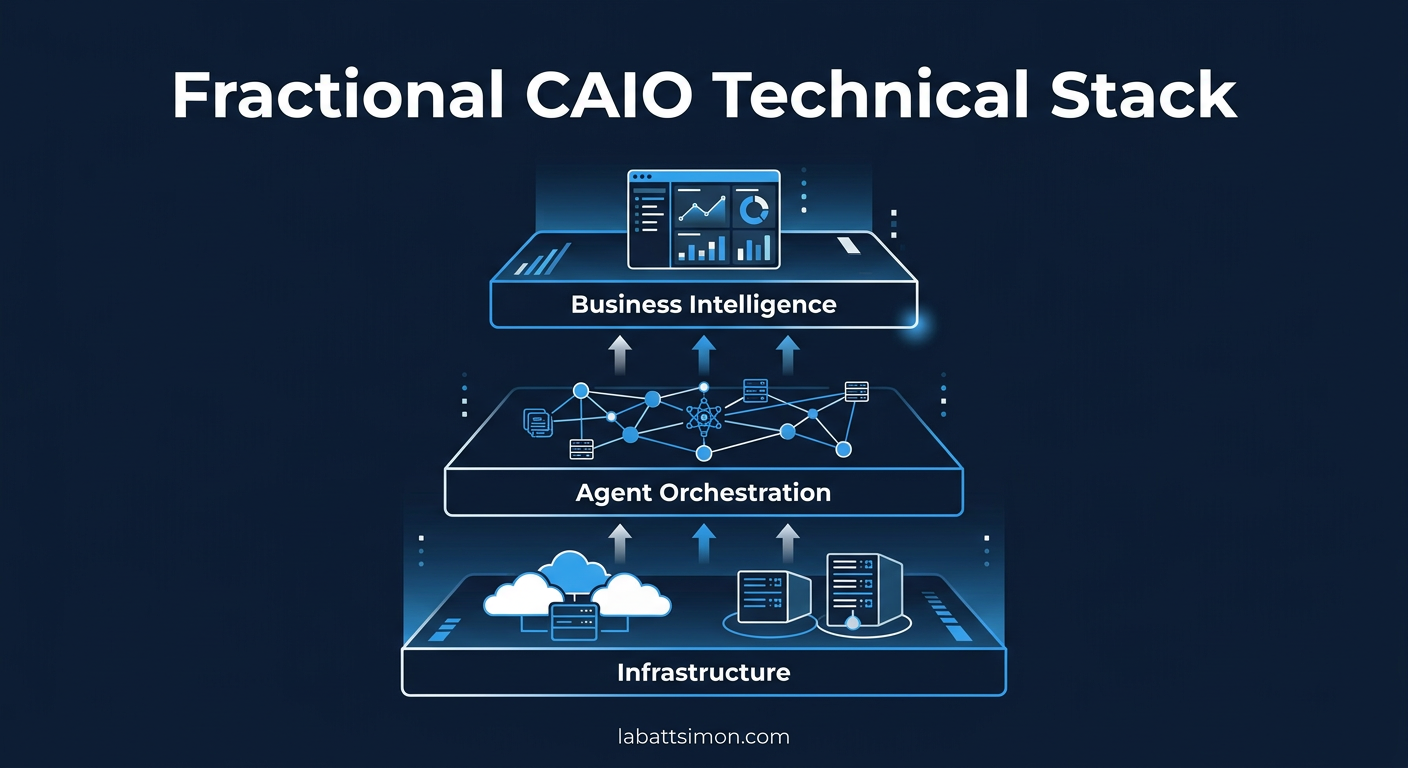
Fractional CAIO: The Technical Execution Stack
A strategy is only as good as the infrastructure supporting it. For a Fractional Chief AI Officer, the challenge isn't just picking a model. It's building a complete Plan-and-Act environment that is secure, cost-effective, and runs on whatever hardware you already own.
After deploying AI systems across 50+ production environments, I've converged on a reference architecture that works for mid-market companies with 200-2000 employees, $50M-$500M revenue, and limited internal AI expertise. This isn't theoretical. Every component described here is running in production right now.
This deep dive covers the full stack, from the orchestration gateway down to the hardware layer, with real costs, real trade-offs, and the mistakes I've learned to avoid.
1. The Gateway Layer: Orchestration and Policy Enforcement
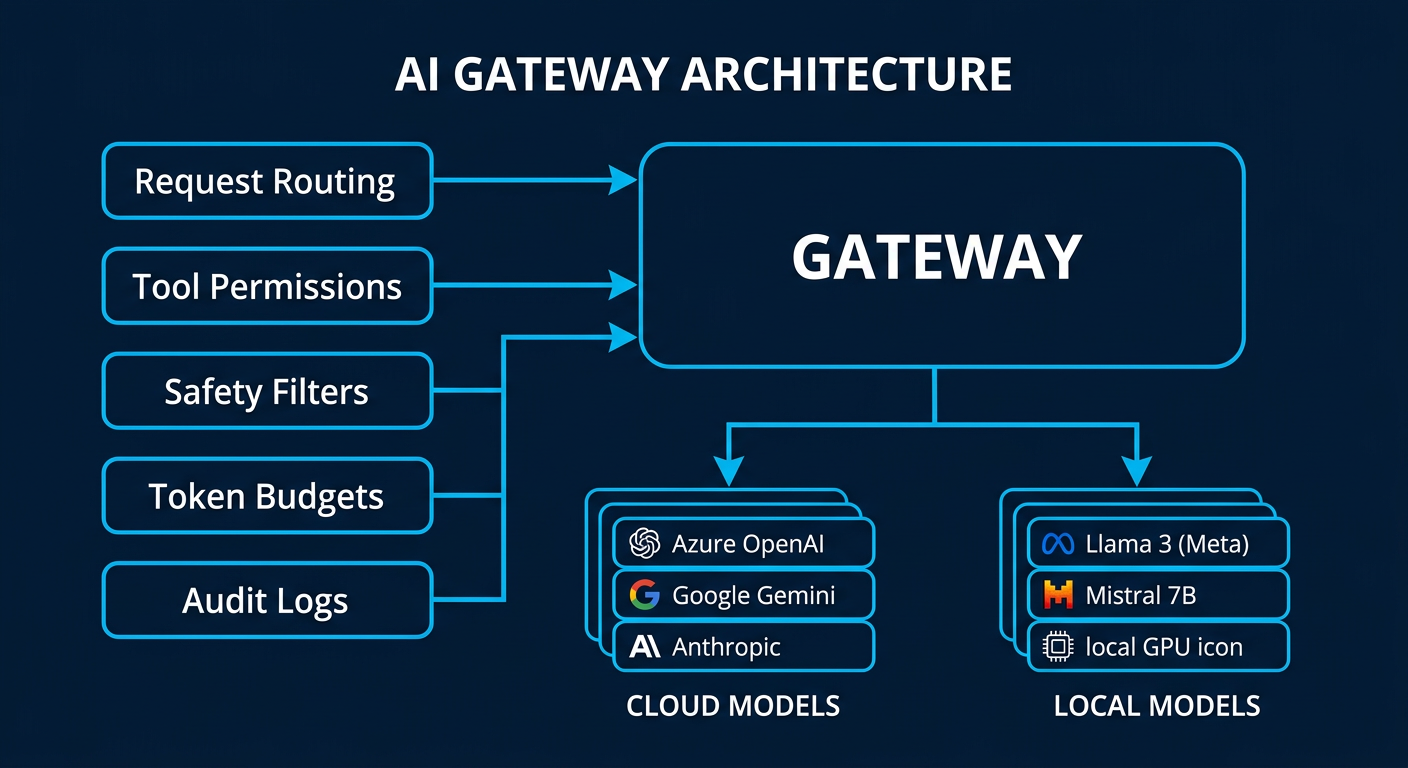
The gateway is the central nervous system of any enterprise AI deployment. Every request from every user and every agent passes through this layer. Get it wrong and you have chaos. Get it right and you have a system that scales without breaking.
What the Gateway Does
The gateway handles five jobs simultaneously:
Request routing. When an agent or user submits a task, the gateway decides which model handles it. A complex financial analysis goes to Claude Opus. A simple data extraction goes to Gemini Flash. A PII check goes to a local 8B model that never touches the internet. This routing happens automatically based on task classification rules you define once.
Tool permissioning. Every agent has a tool allowlist. The HR agent can read the employee database but cannot write to it. The code agent can commit to a staging branch but not to main. The finance agent can pull reports but cannot initiate payments. These permissions are enforced at the gateway level, not in the prompt. Prompt-level restrictions are suggestions. Gateway-level restrictions are walls.
Safety filters. Before any output reaches a human or downstream system, the gateway runs it through toxicity checks, PII detection, and hallucination scoring. If the confidence score drops below your threshold, the output gets flagged for human review instead of being delivered automatically.
Token budgeting. Every agent and every session has a hard spending cap. This prevents the single most expensive mistake in AI deployment: infinite loops. An agent that gets stuck in a reasoning cycle can burn through hundreds of dollars in minutes if there's no kill switch. The gateway enforces per-task, per-session, and per-day limits.
Audit logging. Every request, every response, every tool call, and every routing decision is logged. This isn't optional for regulated industries. But even for non-regulated companies, the audit trail is how you prove ROI. You can show the CFO exactly which tasks were automated, how long they took, and what they cost versus the human equivalent.
Platform Choices
The two platforms I deploy most frequently:
OpenClaw is the current production standard. It's open source, runs locally, and supports multi-agent orchestration out of the box. The key advantage is that your data never leaves your infrastructure. The gateway runs on a $200/month VPS or on hardware you already own. Configuration is declarative (JSON), which means your IT team can version-control the entire AI policy alongside your other infrastructure configs.
NemoClaw (NVIDIA's new open-source agent platform, announced March 2026) is designed specifically for enterprise agent workloads. The architecture is different from OpenClaw in important ways: it's built around long-running autonomous tasks rather than conversational interactions. Agents in NemoClaw can plan, execute, self-check, and recover from errors over multi-hour workflows. It runs on any chip, not just NVIDIA hardware. For companies that need agents running complex, multi-step processes overnight (batch document processing, code migration, data pipeline reconstruction), NemoClaw is purpose-built for that use case.
When to use which: OpenClaw for interactive agent fleets that work alongside humans during the day. NemoClaw for autonomous batch workloads that run unsupervised. Most of my deployments use both.
Security Architecture
The gateway enforces a "VPC Sandbox" or "Chroot Jail" model for every agent. In practice, this means:
Each agent runs in an isolated environment with access only to the files, tools, and network endpoints explicitly granted to it. An agent cannot discover or access resources outside its sandbox. If an agent is compromised (through prompt injection or adversarial input), the blast radius is limited to that single sandbox.
This is the same security model used in container orchestration (Kubernetes pods) and operating system process isolation. It's battle-tested. The only difference is we're applying it to AI agents instead of traditional software processes.
2. The Model Tier: Intelligence vs. Cost
The biggest mistake companies make is using one model for everything. It's like hiring a senior architect to sort the mail. You get great mail sorting, but you're paying $400/hour for it.
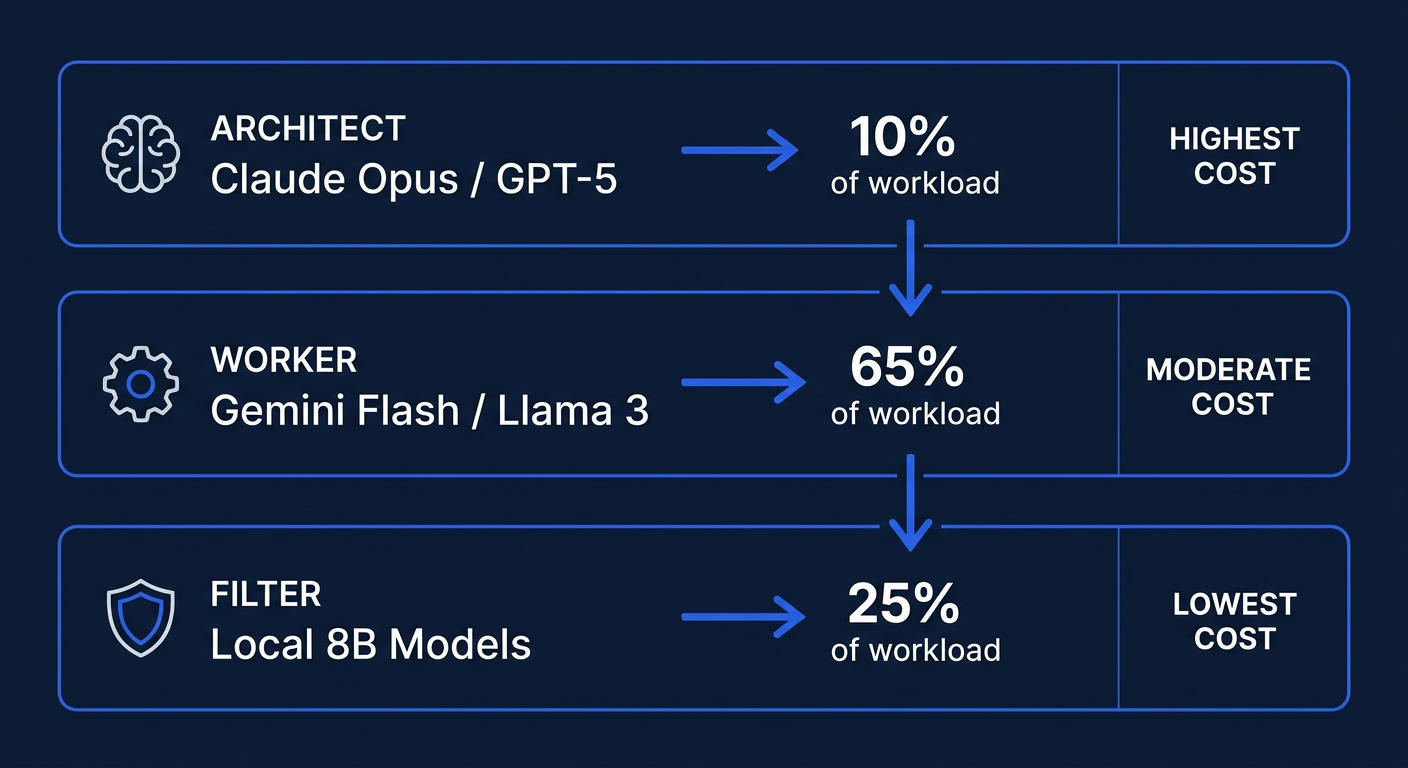
I deploy a three-tier model strategy that keeps monthly inference costs under $2,000 for most mid-market pilots while maintaining production-quality output.
Tier 1: The Architect (Frontier Models)
Models: Claude Opus 4, GPT-5.4 Thinking, Claude Sonnet 4
Use cases: Complex reasoning, multi-step planning, code architecture, financial modeling, strategic document generation, and any task where getting it wrong has real business consequences.
Cost: $15-75 per million output tokens depending on model and context length.
Percentage of total workload: 10-15%. These models handle the hard problems. They decompose complex tasks into subtasks that cheaper models can execute.
Real-world example: When we need to analyze a company's entire codebase and produce a migration plan from legacy PHP to modern microservices, Opus handles the architectural analysis. It reads 200,000 lines of code, identifies dependencies, proposes a phased migration strategy, and generates the project plan. This is a $3-5 task that would take a senior engineer 2-3 days.
Tier 2: The Worker (Mid-Range Models)
Models: Gemini Flash, Claude Haiku, Llama 3 70B (local)
Use cases: Data extraction, RAG-based summarization, routine API calls, email drafting, report generation, customer support routing, and document formatting.
Cost: $0.25-2.50 per million output tokens (cloud) or effectively free for locally hosted models.
Percentage of total workload: 60-70%. This is where the volume lives. These models are fast, cheap, and accurate enough for structured tasks where the expected output format is well-defined.
Real-world example: Processing 500 inbound support tickets per day. The Worker model reads each ticket, classifies it by urgency and department, extracts key entities (customer name, product, issue type), drafts a response template, and routes it to the right queue. Total daily cost: approximately $1.50.
Tier 3: The Filter (Small Local Models)
Models: Llama 3 8B, Gemma 2B, Phi-3 Mini (all self-hosted)
Use cases: PII detection, toxicity filtering, intent classification, and pre-screening before sending data to cloud models.
Cost: Zero marginal cost (runs on existing hardware).
Percentage of total workload: 20-25%. Every piece of data that might contain sensitive information passes through this layer first. The small model strips or flags PII before the data ever reaches a cloud API.
Why this matters: If an employee pastes a customer's Social Security number into a support query, the Tier 3 filter catches it before it leaves your network. The cloud model never sees it. Your compliance team sleeps better.
The Cost Math
For a typical mid-market deployment (500 employees, 5 active agent workflows):
| Tier | Monthly Volume | Cost/Month |
|---|---|---|
| Tier 1 (Architect) | ~2M tokens | $150-300 |
| Tier 2 (Worker) | ~50M tokens | $200-500 |
| Tier 3 (Filter) | ~30M tokens | $0 (local) |
| Total | $350-800 |
Compare that to the industry average of $15,000-25,000/month for enterprise AI SaaS subscriptions that lock you into a single vendor and require your data to leave your network.
3. The Data Tier: Secure RAG and Context Management
AI is useless without your company's data. But your company's data should never train someone else's model.
This is the tension at the center of every enterprise AI deployment, and it's the reason most mid-market companies are stuck in "AI-curious" mode. They know they need AI to access internal knowledge. They're terrified of what happens to that knowledge once it does.
The solution is a layered data architecture that keeps sensitive information inside your perimeter while still giving agents the context they need to be useful.
Vector Database: Your Company's AI Memory
A vector database stores your documents, wikis, SOPs, and institutional knowledge as mathematical embeddings that AI models can search semantically. Instead of keyword matching ("find documents containing 'quarterly revenue'"), the agent can search by meaning ("find anything related to our financial performance this quarter").
Deployment options:
Qdrant (self-hosted) is my default recommendation for mid-market. It's open source, lightweight, and runs comfortably on a single server with 32GB RAM. For a company with 50,000 documents, the entire vector index fits in about 8GB of memory. Search latency is under 50 milliseconds.
Milvus (self-hosted or managed) is the choice for larger deployments. If you have millions of documents or need distributed scaling across multiple servers, Milvus handles it. The trade-off is more operational complexity.
Pinecone or Weaviate (managed cloud) for companies that don't want to manage infrastructure. The data leaves your network, so this only works for non-sensitive content or with appropriate data processing agreements.
The Privacy Proxy
This is the component that makes the whole system safe for regulated industries.
The Privacy Proxy sits between your internal data and any external AI model. Before any text is sent to a cloud API, the proxy:
- Scans for PII patterns (Social Security numbers, credit card numbers, email addresses, phone numbers, names associated with account records)
- Replaces detected PII with anonymized tokens (e.g., "John Smith" becomes "[PERSON_1]", "555-0123" becomes "[PHONE_1]")
- Sends the sanitized text to the cloud model
- Receives the response
- Re-hydrates the tokens back to the original values before delivering to the user
The cloud model never sees real PII. The response is contextually correct because the model understands "[PERSON_1] called about their account" just as well as it understands the real name.
For maximum security, the Privacy Proxy runs entirely on your local network. It's a stateless service that processes text in memory and never writes PII to disk.
Live Tooling via MCP (Model Context Protocol)
MCP is the standard protocol for connecting AI agents to external tools and data sources. Think of it as USB for AI: a universal interface that lets agents plug into any system that implements the protocol.
What this means in practice:
Your AI agents can read and write to Jira, pull data from Salesforce, commit code to GitHub, search Confluence, query your database, send Slack messages, and interact with any internal API, all through authorized, audited, permissioned connections.
Each MCP connection has its own authentication, its own permission scope, and its own audit trail. The agent that handles customer support can read Salesforce tickets but cannot access the HR system. The agent that manages code reviews can read GitHub but cannot access the financial database.
Implementation detail: MCP connections can run over stdio (for local tools) or HTTP/SSE (for remote services). Most enterprise tools already have MCP servers available as open-source packages. For custom internal tools, building an MCP server is typically a 1-2 day development effort.
4. The Execution Tier: Production-Grade Sandboxes
This is where the actual work happens. Agents plan, execute, validate, and deliver within isolated execution environments.
Local Hardware Options
The days of needing a $100,000 GPU cluster to run AI are over. For mid-market deployments, I typically recommend:
Mac Studio (M2/M3 Ultra, 192GB RAM): Runs Llama 3 70B locally at usable speeds. Handles all Tier 2 and Tier 3 workloads without any cloud dependency. Cost: $4,000-7,000 one-time. Pays for itself in 2-3 months versus cloud inference costs.
Linux workstation with NVIDIA A100 or H100: For companies that need to run larger models locally or require GPU-accelerated inference for high-volume workloads. Cost: $15,000-30,000 one-time. Required only for deployments processing millions of tokens per day locally.
Existing cloud VPS: A $200/month Hetzner or AWS instance handles the gateway, vector database, and Tier 3 models comfortably. This is the minimum viable deployment for companies that want to test the architecture before investing in hardware.
Infrastructure-as-Code
Every component of the AI stack is defined in Terraform and Docker Compose files. This means:
Reproducibility. If the server crashes, the entire stack can be rebuilt from configuration files in under an hour. No tribal knowledge. No "it worked on my machine."
Version control. Every change to the AI infrastructure is tracked in Git. You can see who changed what, when, and why. You can roll back to any previous configuration.
Ephemeral sandboxes. For sensitive tasks (processing financial data, handling HR records), we spin up temporary execution environments that exist only for the duration of the task. When the task completes, the sandbox and all its data are destroyed. Nothing persists. This is the gold standard for data minimization compliance.
Inter-Rater Validation (IRV)
This is the quality assurance layer that separates a toy AI deployment from a production system.
For every high-stakes output, a secondary "Judge" agent independently evaluates the primary agent's work against a human-provided rubric. The rubric defines what "good" looks like for each task type: accuracy thresholds, required elements, formatting standards, and business logic rules.
In our TechNova Benchmark study, this dual-agent validation approach improved output accuracy by 9.1 percentage points. The Judge catches errors that the primary agent misses, particularly in complex multi-step tasks where small mistakes compound.
- How it works in practice:
- The "Doer" agent completes the task
- The "Judge" agent receives the output and the rubric (but not the Doer's reasoning)
- The Judge scores the output on each rubric dimension
- If the score is above threshold, the output is delivered
- If the score is below threshold, the output is flagged for human review or sent back to the Doer for revision
This adds approximately 30-40% to the token cost of a task but reduces error rates by over 50%. For most business processes, that trade-off is overwhelmingly positive.
5. Deployment Methodology: The Agentic Transition
We don't move the whole company to AI at once. That's how you get resistance, errors, and the kind of catastrophic failure stories that make the news.
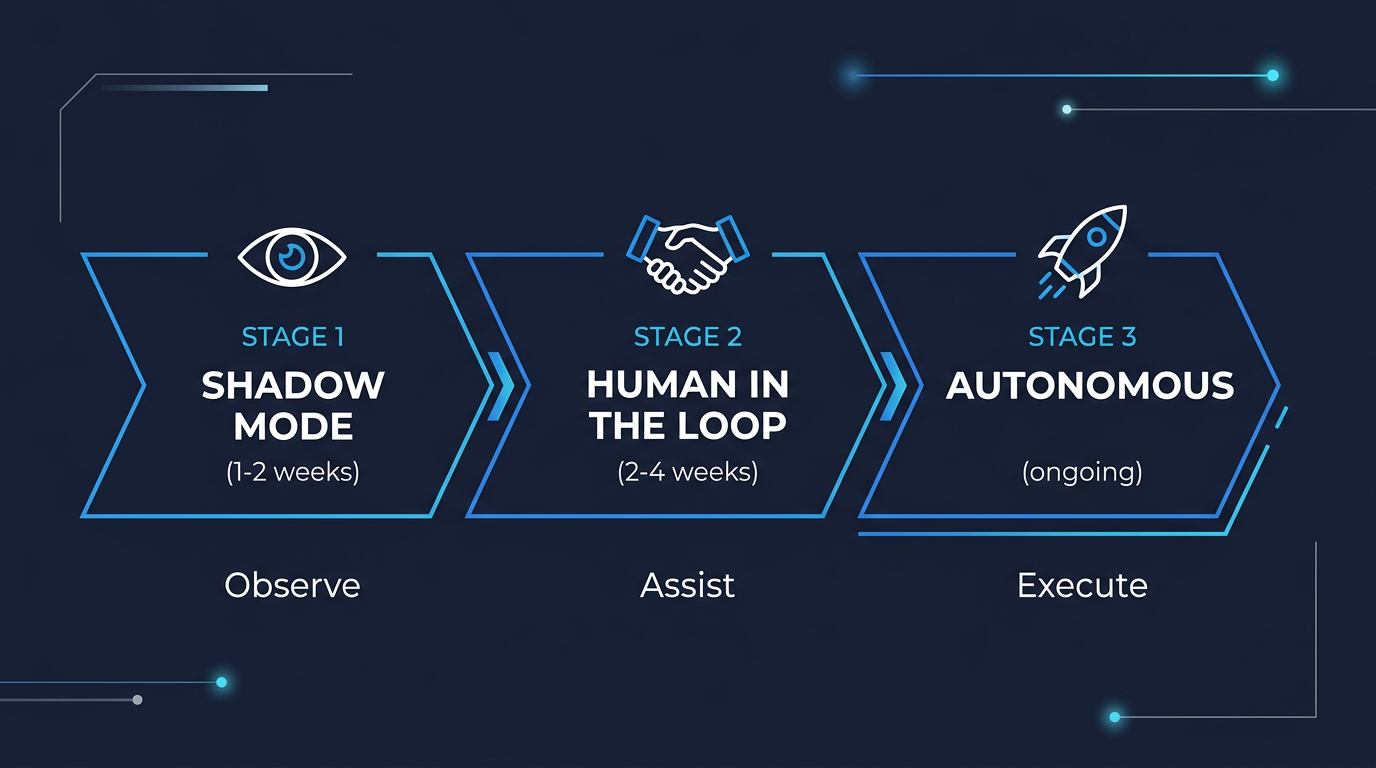
Instead, every workflow passes through three gates over a 30-60 day period:
Gate 1: Shadow Mode (Read-Only)
The agent observes the workflow as it currently operates. It watches how humans handle tasks, what tools they use, what decisions they make, and where they struggle. The agent produces analysis and suggestions but takes no action.
Duration: 1-2 weeks.
What you learn: Where the real bottlenecks are (often different from where management thinks they are). What information the agent needs access to. Where the existing process has undocumented steps that only experienced employees know.
Real example: Shadowing a customer support workflow revealed that 40% of ticket resolution time was spent searching across three different knowledge bases for the same information. The AI solution wasn't a smarter chatbot. It was a unified search layer that the human agents could query in natural language.
Gate 2: Human-in-the-Loop (HITL)
The agent now prepares work products, but a human reviews and approves before anything is delivered or committed. The agent drafts emails, writes code, generates reports, and creates documents. The human presses "send" or "commit."
Duration: 2-4 weeks.
What you learn: Where the agent's output is consistently good enough to trust. Where it needs more context or better instructions. What edge cases exist that weren't apparent in Shadow Mode.
Success metric: When the human reviewer is approving 90%+ of the agent's output without modification, the workflow is ready for Gate 3.
Gate 3: Autonomous (Guardrailed)
The agent operates independently within strict boundaries. Tool access limits, spending caps, output quality thresholds, and escalation rules are all enforced at the gateway level. The agent handles the routine 90% of cases automatically. The unusual 10% gets escalated to a human.
Duration: Ongoing, with weekly reviews for the first month.
What you monitor: Error rates, cost per task, customer satisfaction scores (for customer-facing workflows), and escalation frequency. If any metric drifts outside acceptable bounds, the workflow automatically drops back to Gate 2.
Why This Works
The three-gate approach achieves two things that matter to mid-market leadership:
Risk management. At no point is the company exposed to unvalidated AI output. Every workflow earns autonomy through demonstrated reliability. If something goes wrong, you know exactly which gate to revert to.
Change management. Employees see the AI working alongside them (Gate 1), helping them (Gate 2), and eventually handling the routine work they didn't want to do anyway (Gate 3). Resistance drops because the transition is gradual and the benefits are visible at every stage.
6. Monitoring, Observability, and Continuous Improvement
Deploying AI is not a one-time event. It's an ongoing operational discipline, the same as maintaining any other critical business system.
The AI Operations Dashboard
Every production deployment includes a real-time monitoring dashboard that tracks:
Cost per task. Broken down by model tier, agent, and workflow. This is how you prove ROI to the CFO. When the cost per customer support ticket drops from $4.50 (human) to $0.12 (AI-assisted), the dashboard shows it in real time.
Quality scores. The IRV system generates continuous quality metrics. You can track accuracy trends over time, catch degradation early, and identify which task types need prompt engineering improvements.
Latency and throughput. How long each task takes and how many tasks the system processes per hour. This matters for customer-facing workflows where response time affects satisfaction.
Escalation rates. How often the AI escalates to a human. A rising escalation rate might mean the business processes are changing and the AI needs updated context, or it might mean the AI's quality is degrading and needs attention.
Token spend. Real-time tracking of API costs with automated alerts when spending exceeds daily or weekly budgets.
Governance and Compliance
For regulated industries (healthcare, financial services, legal), the monitoring layer also provides:
Complete audit trails. Every decision the AI makes, every piece of data it processes, and every output it generates is logged with timestamps, model versions, and confidence scores.
Bias monitoring. Regular automated checks on output patterns to detect demographic or systematic biases that might expose the company to regulatory or reputational risk.
Model versioning. When models are updated (new versions of Claude, GPT, or local models), the system tracks which model version produced which outputs. If a model update introduces a regression, you can identify exactly which outputs were affected.
The Feedback Loop
Every human correction, every escalation, and every quality score feeds back into the system. Over time, the prompts get better, the routing gets smarter, and the quality thresholds get tighter. This is the compounding advantage of a well-architected AI deployment: it gets better every week without additional capital investment.